

Printer Test
Test your printer's color, black, alignment, nozzles, and print quality directly from your browser.
Printer Tests
Choose a Printer Test
Printer Test
Complete printer test pageColor Printer Test
Check color output and gradientsBlack & White Printer Test
Check black and grayscale printingCMYK Printer Test
Check cyan, magenta, yellow and blackGrayscale Printer Test
Check gray tones and black outputPrinter Alignment Test
Check positioning, skew and print alignmentPrinter Nozzle Test
Find missing lines and uneven outputPrint Quality Test
Check text, lines, gradients and detailPrinter Margin Test
Check margins, printable area, and paper positionPhoto Printer Test
Check photo color and detailPrinter Scaling Test
Check actual-size printingDiagnostics
What problem are you seeing?
Printer printing lines
Lines, streaks, or bands on prints
Printer printing streaks
Repeated marks, bands, or smears
Printer prints with gaps
Missing sections or white gaps
Printer not printing black
Black text or blocks missing
Printer not printing color
Color missing or absent
Colors look wrong
Shifts, casts, or inaccurate color
Faded printing
Pale or washed-out output
Blurry printing
Soft, doubled, or smeared output
Blank pages
Pages feed but print nothing
Process
How PrinterInspect Works
Choose a test
Select the printer test that matches your problem.
Print the test page
Use your browser's print dialog to print it.
Inspect the result
Compare the printed pattern and find the next recommended test.
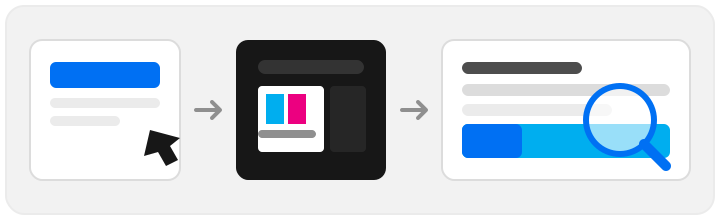
PrinterInspect runs in your browser. Your files and print data are not uploaded.
Compatibility
Works With Most Printers
- HP
- Canon
- Epson
- Brother
- Samsung
- Xerox
- and more
What is PrinterInspect?
PrinterInspect is a free, browser-based toolkit for checking how a printer actually prints. Every test page is generated in your browser and sent straight to your printer through the print dialog you already use: no app, no signup, no upload. Print a pattern, hold it next to the screen, and spot blocked nozzles, misaligned heads, uneven color and weak blacks in under a minute.
FAQ
Frequently Asked Questions
How do I test my printer?
Pick a test above, open it, and print the page from your browser's print dialog. Compare the printed result with the pattern shown on screen.
Is PrinterInspect free?
Yes. PrinterInspect's printer test pages are free to use. You can open a test, print it from your browser, and inspect the result without installing software or creating an account.
Can I test my printer without installing software?
Yes. PrinterInspect runs entirely in your browser. Open a test page, print it, and inspect the result. Nothing to install or download.
Can I print the test on A4 or Letter paper?
Yes. Where supported, choose A4 or Letter before printing. Use 100% or Actual Size when the test page requires accurate measurements.
How do I test printer color?
Print the Color Printer Test or CMYK Printer Test. Each block should print evenly, and cyan, magenta, yellow and black should stay clearly separate.
How do I test printer alignment?
Print the Printer Alignment Test page. The pattern shows where the lines should meet. Gaps, doubling or offsets mean the print head needs aligning.
How do I check printer nozzles?
Print the Printer Nozzle Test page. Missing or broken lines show which nozzles are blocked, so you know which cleaning cycle to run.
Why is my printer printing lines?
Lines usually come from a blocked nozzle, a dirty print head, or a misaligned head. Run the Printer Nozzle Test first, then the Printer Alignment Test to narrow it down.
Does PrinterInspect work with HP, Canon and Epson printers?
PrinterInspect works with printers that can print from your browser or operating system print dialog, including HP, Canon, Epson, Brother, Samsung and Xerox models.